<assembly.drawing.page />
assembly.drawing.page defines a paper sheet for outline drawings of an assembly or board. Give each page a unique name to select it during CLI export.
import { assembly } from "@tscircuit/core"

export default () => (
  <assembly.device name="controller">
    <board name="carrier" width="80mm" height="50mm" thickness="1.6mm">
      <hole name="H1" diameter="3.2mm" pcbX={-35} pcbY={-20} />
      <hole name="H2" diameter="3.2mm" pcbX={35} pcbY={-20} />
      <hole name="H3" diameter="3.2mm" pcbX={35} pcbY={20} />
      <hole name="H4" diameter="3.2mm" pcbX={-35} pcbY={20} />
    </board>
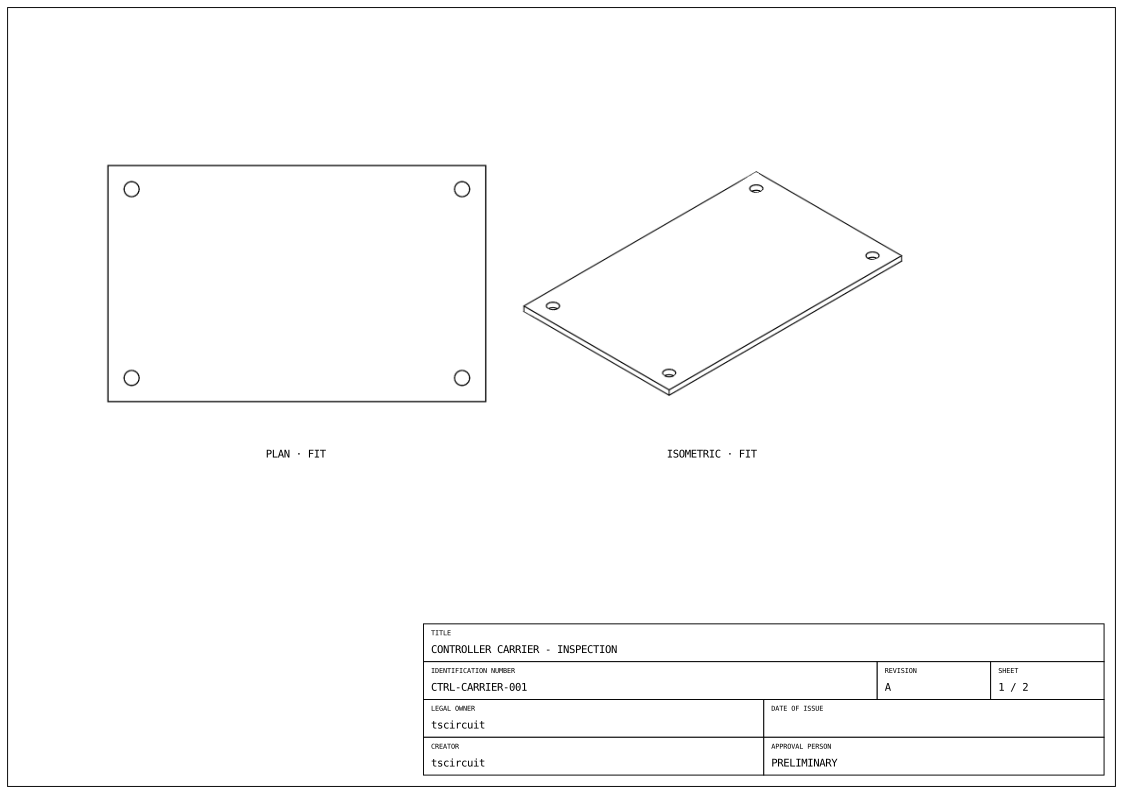
    <assembly.drawing.page name="carrier-inspection" size="iso_a4">
      <assembly.drawing.partview
        partRef=".carrier" name="plan" displayName="PLAN"
        direction="z+" width="110mm" height="85mm"
        centerX="-70mm" centerY="30mm"
      />
      <assembly.drawing.partview
        partRef=".carrier" name="overview" displayName="ISOMETRIC"
        direction="isometric" width="110mm" height="85mm"
        rightOfRef=".plan" centerY="30mm"
      />
      <assembly.drawing.titleblock
        title="CONTROLLER CARRIER - INSPECTION"
        identificationNumber="CTRL-CARRIER-001"
        revisionIndex="A" legalOwner="tscircuit"
        creator="tscircuit" approvalPerson="PRELIMINARY"
        sheetNumber={1} numberOfSheets={2}
      />
    </assembly.drawing.page>
    <assembly.drawing.page name="carrier-section" size="iso_a4">
      <assembly.drawing.partview
        partRef=".carrier" name="section" displayName="SECTION THROUGH H3 AND H4"
        direction="y+" width="220mm" height="65mm" centerY="25mm"
        section={{ axis: "y", offset: "20mm", keepSide: "less", hatchSpacing: "1mm" }}
      />
      <assembly.drawing.titleblock
        title="CONTROLLER CARRIER - MOUNTING HOLE SECTION"
        identificationNumber="CTRL-CARRIER-002" revisionIndex="A"
        legalOwner="tscircuit" creator="tscircuit"
        approvalPerson="PRELIMINARY" sheetNumber={2} numberOfSheets={2}
      />
    </assembly.drawing.page>
  </assembly.device>
)
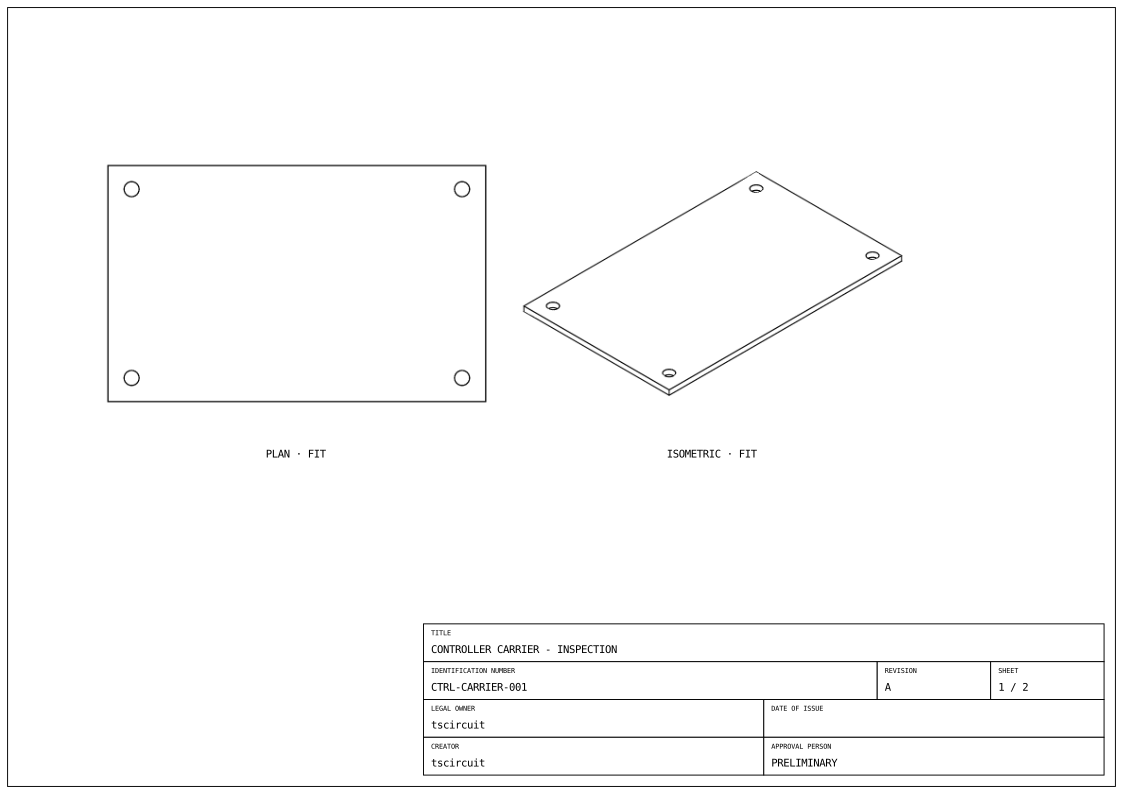
Use the Drawing tab to inspect each sheet. The arrows below it switch between the inspection and section pages.
The exported sheet shows the carrier's outline and four mounting holes:
Properties
| Property | Description |
|---|---|
name | Page name used by tsci build --drawing and tsci export --drawing. |
displayName | Optional human-readable page label. |
size | Standard paper size: iso_a0 through iso_a4, or ansi_a through ansi_e. |
orientation | landscape (default) or portrait, when using size. |
width, height | Both required for a custom sheet. Numbers are millimetres; unit strings such as "210mm" also work. Use these instead of size and orientation. |
anchorAlignment | Coordinate anchor: center (default), top_left, top_center, top_right, center_left, center_right, bottom_left, bottom_center, or bottom_right. |
children | One or more assembly.drawing.partview or assembly.drawing.explosionview elements, notes, and optionally one assembly.drawing.titleblock. |
Choose either a standard size or custom width and height. Page dimensions describe paper, not the physical assembly. A page needs at least one part or explosion view to export.
To annotate measurements, put assembly.drawing.dimension elements inside either kind of view. Dimensions can measure view extents, named CAD outlines, hole spacing, and edge-to-hole offsets.
Page coordinates
anchorAlignment chooses where (0, 0) lies on the sheet. View centers and annotation paperX/paperY values are relative to that anchor. Axes always remain positive X right and positive Y up. For bottom_left, positions inside the sheet are positive; for top_left, positions below the top edge use negative Y.
Annotations can instead use xOffsetFromViewCenter and yOffsetFromViewCenter to follow a view. Each axis chooses either a page-relative coordinate or a view-relative offset. See the fidget explosion example for a bottom-left anchored sheet with both kinds of positioning.
Export the page
Save the example as carrier.circuit.tsx:
tsci build carrier.circuit.tsx --drawings
tsci export carrier.circuit.tsx --drawing carrier-inspection
Build writes dist/carrier/drawings/carrier-inspection.svg. Export writes carrier-inspection.svg beside the input file. To select by generated filename and choose a destination:
tsci export carrier.circuit.tsx --drawing carrier-inspection.svg --output inspection.svg
name is the page identity, not a path. The CLI makes a safe SVG filename from it, replacing spaces and other unsupported filename characters with hyphens. Unnamed pages use drawing-1.svg, drawing-2.svg, and so on, in page order. Use unique page names; colliding filenames are rejected.
See tsci build for exporting every page and tsci export for single-page selection and output paths.